
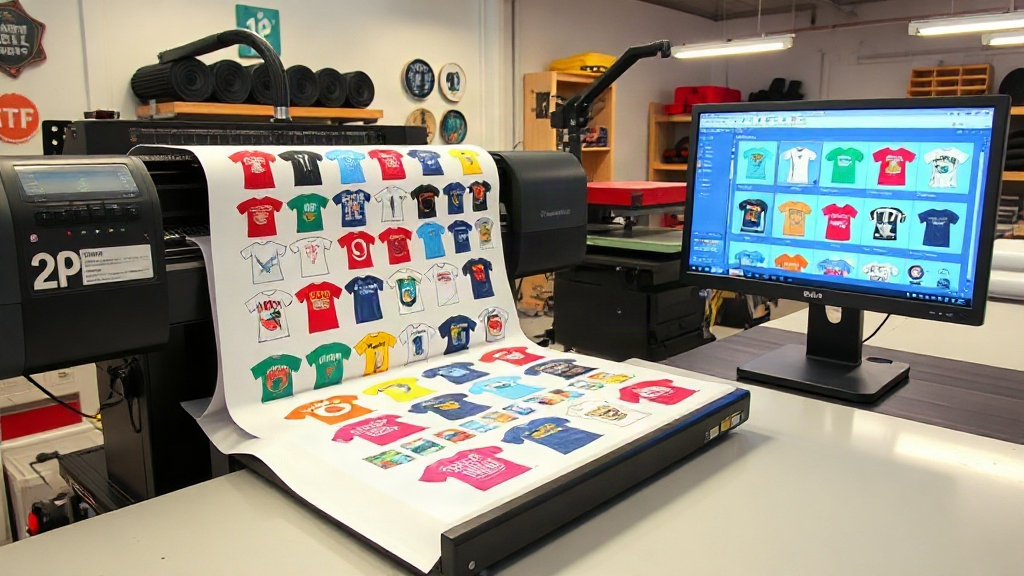
If you run a custom apparel business, you know that time is money. Every minute spent manually arranging transfers on a sheet is a minute not spent fulfilling orders. That's where a DTF gangsheet builder comes in. This powerful tool lets you automatically nest multiple designs onto a single film, slashing waste and labor costs. But are you using it to its full potential? In this guide, we'll dive deep into gang sheet optimization, sharing real-world strategies to help you print smarter, not harder.
What Is a Gang Sheet and Why Does It Matter?
A gang sheet is a single sheet of DTF film containing multiple printed transfers. Instead of printing each design individually, you group them together, maximizing the use of the film. This approach saves film, ink, and time. For example, a typical DTF film roll is 13 or 24 inches wide; a gang sheet lets you fill that width with various designs, leaving minimal empty space.
But creating an efficient gang sheet manually is tedious. You'd have to measure each design, arrange them without overlaps, and ensure proper spacing for cutting. That's where a DTF gangsheet builder shines. These software tools automate the nesting process, often using algorithms to pack designs as tightly as possible. The result? More transfers per sheet, lower cost per transfer, and faster turnaround.
How a DTF Gangsheet Builder Works
At its core, a gang sheet builder is a layout tool. You upload your designs (usually PNG files with transparent backgrounds), set the film size, and the software arranges them optimally. Most builders let you adjust spacing, rotate designs, and even mirror images for dark garments. Some advanced builders also integrate with your printer's RIP software, ensuring color accuracy and proper ink limits.
But not all builders are created equal. Some are web-based, others are desktop apps. Some offer automatic nesting, while others require manual dragging. The best builders combine automation with flexibility, letting you fine-tune the layout before printing. For instance, you might want to group designs by order or by color to simplify cutting and pressing.
Key Features to Look For
- Automatic nesting: The software should intelligently arrange designs to minimize waste. Look for algorithms that consider rotation and spacing.
- Custom film sizes: You should be able to set any roll width and length, including custom sizes for special projects.
- Design library: A built-in library or easy upload from cloud storage saves time.
- Cost calculator: Some builders estimate ink and film usage, helping you price jobs accurately.
- Export options: The ability to export as PDF or directly to your printer's format is crucial.
Benefits of Using a DTF Gangsheet Builder
The advantages go beyond just saving film. Here's what you gain:
- Reduced material costs: By maximizing film usage, you can cut film waste by up to 30% or more.
- Time savings: Automated nesting takes seconds, compared to manual layout which can take 10-15 minutes per sheet.
- Consistency: Standardized layouts mean fewer errors and predictable results.
- Scalability: As your order volume grows, a builder helps you handle larger batches without hiring more staff.
Consider this: If you print 50 sheets a week and save just 10 minutes per sheet, that's over 8 hours saved weekly. That's a full workday you can reinvest in marketing or taking on more orders.
Step-by-Step: Creating a Gang Sheet with a Builder
Let's walk through the typical process using a DTF gangsheet builder. While specifics vary by tool, the general workflow is similar.
- Upload your designs: Gather all the images you want to print. Ensure they are high-resolution (300 DPI) and have transparent backgrounds.
- Set film dimensions: Enter the width of your film roll (e.g., 13 inches) and the desired length (e.g., 36 inches). The builder will create a canvas.
- Add designs: Drag and drop designs onto the canvas, or let the auto-nest feature place them.
- Adjust spacing and rotation: Most builders allow you to set a minimum gap between designs (e.g., 0.1 inch) and rotate designs for better fit.
- Review and optimize: Check for overlaps and empty spaces. Some builders show a utilization percentage; aim for 85% or higher.
- Export and print: Save the layout as a PDF or send it directly to your DTF printer. Print, cure, and you're ready to press.
Pro tip: Group designs by order or customer to simplify cutting and packing. Many builders let you add labels or notes.
Common Mistakes to Avoid
Even with a builder, users often make mistakes that cost time and money. Watch out for these:
- Insufficient spacing: Designs too close together can bleed or be hard to cut. Leave at least 0.1 inch between designs.
- Forgetting mirroring: If you're printing on clear film for dark garments, you need to mirror the image. Some builders do this automatically; others require a toggle.
- Ignoring ink limits: Overloading ink can cause smudging and curing issues. Stick to your printer's recommended settings.
- Not updating software: Builders improve with updates. Regularly check for new features and bug fixes.
Choosing the Right DTF Gangsheet Builder
With so many options, how do you choose? Start by listing your must-have features. If you're a small shop, a free or low-cost web-based builder might suffice. For high-volume production, invest in a robust desktop application with advanced nesting and integration with your printer's RIP.
Consider these factors:
- Ease of use: A steep learning curve costs time. Look for intuitive interfaces and good tutorials.
- Compatibility: Ensure the builder supports your printer and film sizes.
- Support: Responsive customer support can be a lifesaver when you're on a deadline.
- Pricing model: Some charge per sheet, others a monthly subscription. Calculate which fits your volume.
Many popular DTF printer manufacturers offer their own builders, often optimized for their hardware. But third-party options like DTF Gangsheet Builder Pro or GangSheet Master are also worth exploring.
Advanced Tips for Power Users
Once you're comfortable with the basics, try these advanced strategies to squeeze even more efficiency:
- Batch similar jobs: If you have multiple orders with the same design, print them all on one sheet. Use the builder's duplicate function.
- Utilize negative space: Fill gaps with small designs like logos or tags. Even tiny transfers add value.
- Create templates: If you frequently print the same sizes (e.g., 10-inch wide sheets), save a template with pre-set spacing and film size.
- Track utilization: Keep a log of your utilization percentage. Aim to improve it over time; small gains add up.
- Integrate with order management: Some builders can pull designs directly from your order system, reducing manual entry.
Frequently Asked Questions
What is a DTF gangsheet builder and why do I need one?
A DTF gangsheet builder is software that arranges multiple designs onto a single DTF film sheet. You need one to save time, reduce film waste, and increase production efficiency. Manual layout is slow and error-prone; a builder automates the process, often saving 10-15 minutes per sheet.
Can I use a DTF gangsheet builder with any DTF printer?
Most builders export to common formats like PDF or TIFF, which any DTF printer can use. However, some builders are optimized for specific printer brands. Check compatibility before purchasing. If your builder exports a standard file, you can print it on any DTF printer with the right RIP software.
How do I maximize film utilization in a gang sheet?
To maximize utilization, use the auto-nest feature, set minimal spacing (0.1 inch), rotate designs as needed, and fill gaps with small designs. Aim for at least 85% utilization. Regularly review your layouts; even small adjustments can yield significant savings.
Is a DTF gangsheet builder worth the investment?
Absolutely, if you print regularly. The time and material savings quickly outweigh the cost. For example, if you save $5 per sheet in film and 10 minutes of labor, and you print 100 sheets a month, you save $500 and over 16 hours monthly. That's a strong ROI.
What file format works best for gang sheet builders?
PNG with transparent backgrounds is ideal because it preserves transparency and supports high resolution. Avoid JPEGs, which lack transparency. Some builders also accept PDF or TIFF, but PNG is the most universally supported.
By now, you should have a solid understanding of how a DTF gangsheet builder can transform your DTF printing workflow. Whether you're just starting or looking to optimize, the right tool and techniques can significantly impact your bottom line. Remember, efficiency is key in this competitive market. So, take the time to explore builders, experiment with layouts, and watch your profits grow.